FDmap - Fractal Dimension maps for analyzing restored paintings
Juan Ruiz de Miras. University of Granada - SPAIN. 2026.
Last update: March - 2026
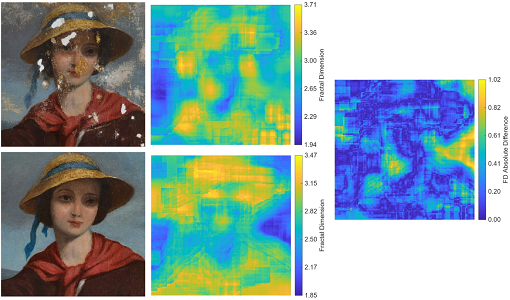
The fractal dimension (FD) is a quantitative measure of complexity that has been effectively used to analyze paintings.
FDmap is a novel methodology that combines FD computation on color images
with a sliding window approach to generate detailed FD maps of paintings before and after restoration.
You can download the C++/CUDA/MATLAB source code of FDmap by clicking here (138 MB).
Example dataset can be downloaded by clicking here (80 MB).
Once unzipped the file fdmap.zip, you will find the following folders and files:
- Folder code/, contains the source code of FDmap, organized as:
- 1_Maps_Creation/, folder with the C++/CUDA code for generating the FD maps:
- fdmap.cpp and fdmap.h: C++ files for generating FD maps
- test.cpp: example of C++ main file generating in parallel the FD maps for the dataset of paintings
- external/: folder with external code for DBC-RGB computing (by Juan Ruiz de Miras), linear regression computation (by geeksforgeeks.org) and reading BMP images (by Arash Partow)
- 2_Maps_Visualization/, folder with the MATLAB code for displaying FD maps and saving as .bmp files
- FDmapVisualization.m: MATLAB code for displaying the FD maps and saving them as .png images
- license.html: terms of the license for the source code of FDmap
- README.txt: text file containing the present information about the program
- dataset/: empty folder where the file dataset.zip must be unzipped
- results/: folder where generated FD maps and .png images will be saved. It contains pre-computed FD maps and .png images for the dataset.
Unzip the dataset.zip file into the folder dataset/, what creates the folders dataset/0_copper/, dataset/1_craquelure/,
dataset/2_paint_losses/, and dataset/3_aged_varnish/. These folders contain the BMP files with all the paintings to be analyzed.
REQUERIMENTS for compilation and execution
Hardware: Computer with a CUDA capable GPU (https://developer.nvidia.com/cuda-gpus)
Software:
COMPILATION AND RUNNING
- Go to folder code/1_Maps_Creation/:
- The test.cpp file can be compiled with the following command (change MATLAB_HOME with the path of your local installation of MATLAB):
- Windows: nvcc -Xcompiler "/openmp" -I"MATLAB_HOME\extern\include" -L"MATLAB_HOME\extern\lib\win64\microsoft" -llibmat -llibmex -llibmx -O3 -o test external/dbc-rgb.cu fdmap.cpp test.cpp
- Linux: nvcc -Xcompiler "-fopenmp" -IMATLAB_HOME/extern/include -LMATLAB_HOME/bin/glnxa64 -lmat -lmex -lmx -O3 -o test external/dbc-rgb.cu fdmap.cpp test.cpp
- Run the file test to process the dataset. Results with the .mat files of the FD maps for each painting are saved in the folder results
- Go to folder code/2_Maps_Visualization/:
- Run the MATLAB file FDmapVisualization.m to process the .mat files generated in the previous step.
The FD maps for all paintings will be displayed and saved as .png images in the folder results
CITATION
If FDmap has been useful for your research, please, cite as:
"Fractal Characterization of Restored Paintings"
Juan Ruiz de Miras, Ana López-Montes, José Luis Víchez, Rosario Blanc and Domingo Martín
Multimedia Tools and Applications 85:366, 2026
https://doi.org/10.1007/s11042-026-21529-7
CONTACT AND SUGGESTIONS
For contact information click here
FUNDING
This software is part of the I+D+i project PID2024-161348OB-I00 granted by the Spanish Ministry of Science, Innovation and University